High Availability - Auto (VMware and AWS)
Description
In this lab, we will configure High Availability (Auto) for BIG-IQ CM. When configuring auto failover, you’ll also create or select an existing Data Collection Device (DCD) as a quorum device. A quorum DCD is used as the deciding vote to determine which BIG-IQ becomes active if communication is disrupted between the active and standby BIG-IQ in the HA pair.
Refer to below AskF5 link if you need further details.
Step 1: High Availability - Auto
For the high availability pair to synchronize properly, each system must be running the same BIG-IQ version, and the clocks on each system must be synchronized to within 60 seconds.
Click System > BIG-IQ HA > Add Standby and enter in the standby device connectivity information
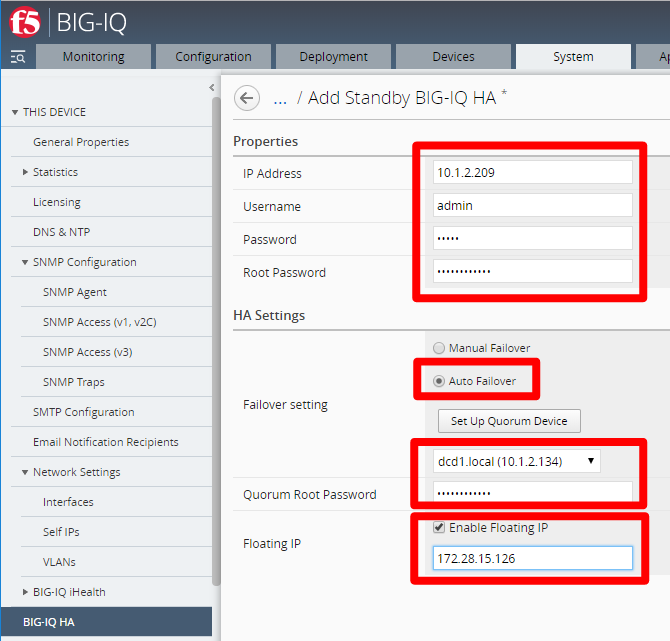
Use self-ip of peer BIG-IQ. Depending on your network configuration you may use the management-ip instead
Enter in admin and root password that you configured in the setup wizard (required)
Click Auto Failover
Select the DCD device that you discovered in the setup lab and enter in its root password
Click Enable Floating IP and enter in an IP in the management subnet. You cannot use the self-IP segment here
Note
Floating IP addresses are not support in public cloud due to limitations in those environments
Click Add to add the HA Peer Device
This completes the BIG-IQ High Availability (Auto) configuration.